avr_skilltree · Release 001

The whole sky, and the hand that draws it.

Five disciplines, forty skills, twenty effects wired to real game natives, and an editor that lets you rebuild every one of them from inside the running server, without a restart and without opening a file.

In the player's hands

One gesture per decision.

Nothing here is a menu of buttons. A player reads a node, commits to it, and moves around the chart with the same three motions every time, so the interface disappears and the choice is the only thing left.

  • Click to read

    The detail panel answers in a fixed order: what it does, what it demands, what it forecloses, what it costs. When the unlock button is disabled it names the reason instead of just greying out.

  • Double-click to commit

    Spending a point is a deliberate double-click on the node itself, rank-ups included. The unlock burst and the energy running down the link make it feel earned rather than transacted.

  • Drag and scroll to move

    Pan from any point on the canvas, nodes included. Zoom stays anchored under the cursor. The whole interface scales with resolution, so 1440p and ultrawide both get a chart you can actually read.

Thirty-seven seconds, in game

All of it, actually running.

Points being spent, an exclusive branch closing its opposite, the circle and square disciplines, the admin panel, and the tree editor rebuilding a tree without a restart. Recorded from the resource, not from this page.

The default theme, untouched. Every colour, font, node shape and motion setting is one JSON file you own.
Gravity

Six ways a build can cost you.

Every one of these is a value in config/trees.lua, not a rule baked into the resource. Turn them all off and you have a shopping list; turn them on and you have a character.

  • Point caps

    A budget, not a wallet

    Cap the points spendable in a discipline and the arithmetic changes. Set pointCap to false for uncapped, or to twenty across forty skills to force a real specialisation.

  • Exclusive branches

    Doors that shut

    Two nodes can permanently lock each other out. The chart draws the rivalry as a dashed rust line, and the confirmation states what is being closed before the point is spent.

  • Ranked nodes

    Depth inside one star

    Up to twenty ranks per skill, pips drawn on the node, and per-rank effect scaling written out in the panel so a player can see what the next rank is worth.

  • Requirements

    Earned access

    Gate a node behind a level, a job, a gang, one parent, or all parents at once. Requirements render as a checklist with each line met or unmet.

  • Respec

    A price you can see

    Refund percentage, money cost, cooldown and whether it needs confirming are all per-tree. The dialog states exactly what comes back and what burns.

  • Prestige

    Room past the ceiling

    Reset a maxed discipline for a permanent, stacking bonus. You choose the threshold and the reward; the bonus survives every future reset.

The refund dialog reading: every skill in this discipline is removed, you get back 3 of the 6 points you spent and lose 3, and it costs $2,000 from your bank. Behind it the Riptide node is struck through in rust, closed off by the point already spent on Marathon.
The refund does the arithmetic out loud before you agree to it. Behind the dialog, Riptide is already closed — the dashed rust line is the rivalry, and the strike is the door that shut.
The editor

Rebuild the sky at runtime.

This is the part other resources charge extra for, or do not have. It ships at base price, in both editions. Open the admin panel, reshape anything, publish, and keep playing, that is the whole loop.

  • Everything is editable

    Trees, nodes, labels, descriptions, icons, grid positions, costs, ranks, level and job and gang requirements, parent links, exclusive pairs, effects, point caps and prestige. All of it, from inside the game, drag-and-drop included.

  • Publish is instant and safe

    Saving re-validates the entire tree set with the same rules used at boot, refunds points for anything you removed on every player currently online, resyncs their effects, and pushes the new chart to open interfaces. A rejected save names the node that is wrong.

  • The file stays the source of truth

    Each save rewrites config/trees.lua in the same readable format the resource ships with. Hand edits and editor edits coexist; nothing is locked into a database you cannot read.

  • A history you can walk back

    Every change lands in a session history with a plain-language label. Undo, redo, or restore any earlier point. Ctrl+Z works.

  • Four shapes, one grid

    Hex, circle, square or diamond per tree. Hex and circle pack as a honeycomb, square and diamond as a grid, switching re-packs the whole tree without touching a single saved position.

  • Import and export

    The complete tree set moves as JSON: back it up, build it on a staging server, or hand it to another community.

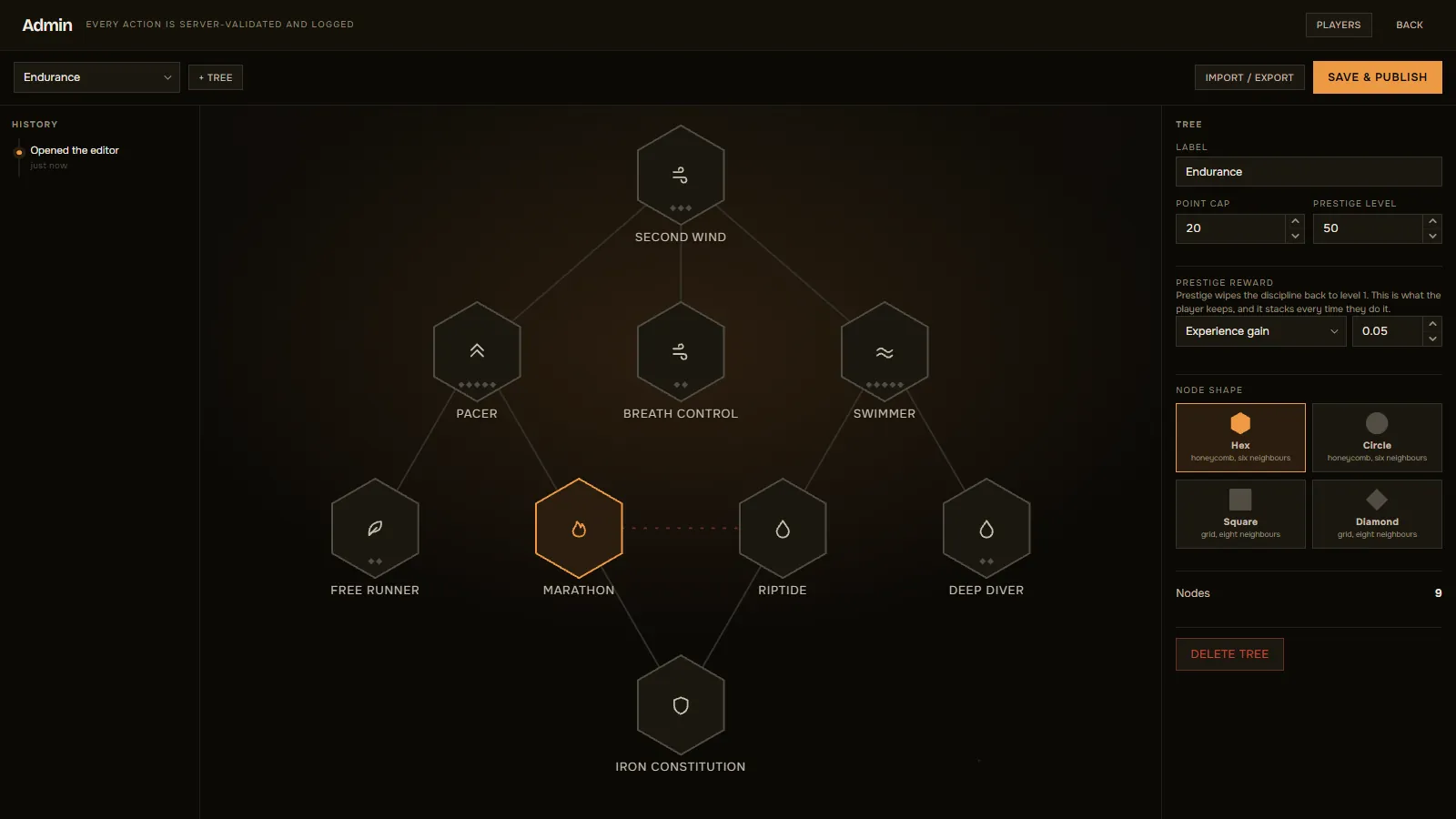
The in-game tree editor. A session history rail on the left, the Endurance tree laid out as draggable hexagons in the middle, and on the right the tree's label, point cap, prestige level and reward, a node shape picker offering hex, circle, square and diamond, and a delete control. Import, export and Save and Publish sit in the top bar.
The editor, in game, over the running server. History on the left, tree properties and the shape picker on the right, Save & Publish in the corner — no restart, no file open.
Administration

Every action gated, every action logged.

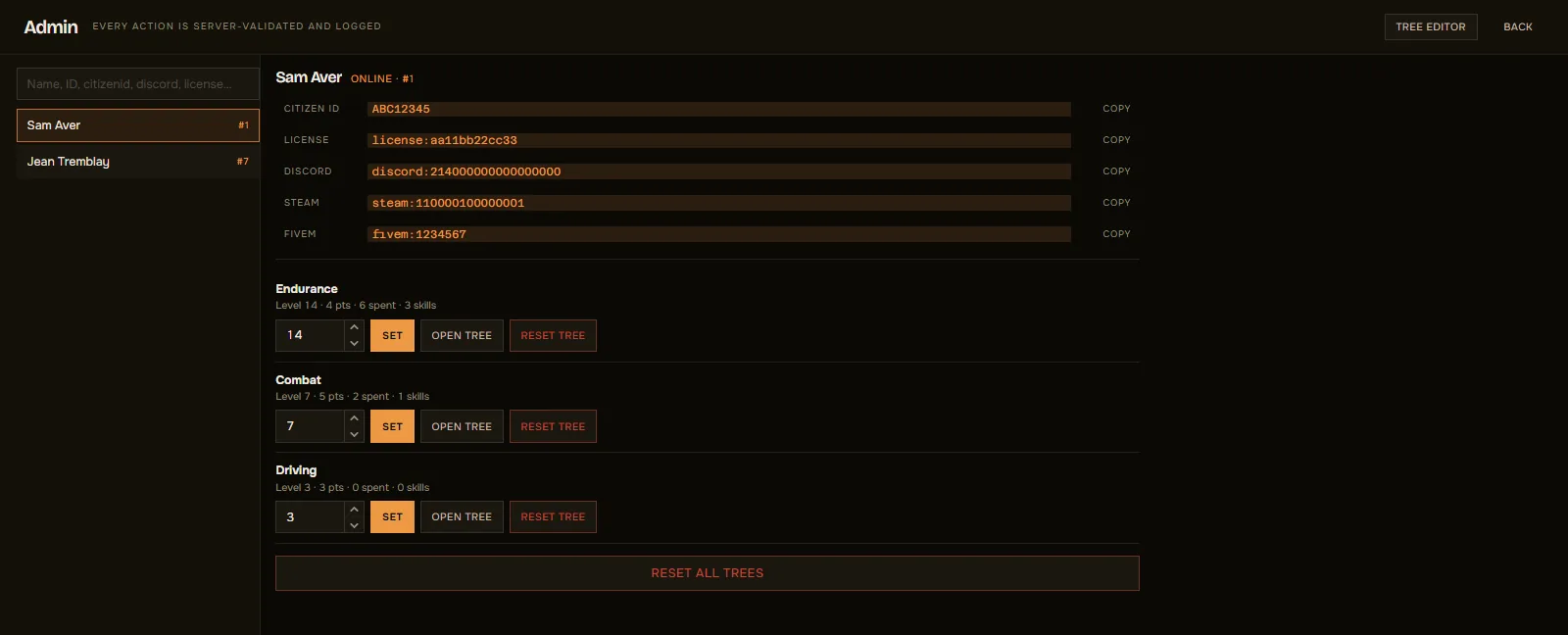
The same menu opens player administration. Look up anyone online or offline by name, Citizen ID or identifier, inspect their trees, set a level, reset one tree or all of them. Destructive actions take a second, confirming click.

Access is one ace permission, checked server-side on every call, not in the interface, where it would be worth nothing.

  • The identity card

    Every identifier on file, license, license2, Discord, Steam, FiveM, each one click from the clipboard. Frameworks with a citizen id show it too; standalone servers persist on the license, so the duplicate row is hidden rather than left blank.

  • A console trail

    Config.AdminDebug prints who did what to whom, on the server, by default. Turn it off if your logs are elsewhere.

The player administration panel. A search field and the online player list on the left; on the right the selected player's citizen id, license, Discord, Steam and FiveM identifiers each with a copy control, then one row per discipline showing level, points, spend and skill count with a level field, a set button, an open tree button and a reset tree button, and a reset all trees control beneath.
One player, every identifier, and one row per discipline. Every action is server-validated and logged is printed in the panel's own header, not just in the docs.
Effects

Twenty effects, all wired to natives.

Not twenty names in a config, twenty things that measurably happen in game. Values are fractions, so 0.10 is ten percent more and -0.08 is eight percent less. They stack additively across ranks and nodes.

There is no reload-speed effect, because GTA does not expose reload timing. A config that asks for one gets a console warning instead of a node that silently does nothing.

  • stamina_regen
  • sprint_mult
  • sprint_drain
  • swim_mult
  • lung_capacity
  • health_regen
  • melee_mult
  • weapon_damage
  • recoil_mult
  • noise_mult
  • fall_damage
  • max_armor
  • max_health
  • xp_mult
  • weapon_defense
  • melee_defense
  • vehicle_defense
  • engine_power
  • wanted_mult
  • bike_grip

Need one that is not here? Register it from any resource with RegisterEffect and it behaves like a built-in.

Cost of running it

0.00ms idle, one row per player.

A progression system should not be something you notice in resmon. Nothing ticks while the interface is closed. Effects are applied from statebag changes rather than a polling loop, and the single managed thread only runs while a stamina effect is actually active.

  • Storage that stays small

    One row per player, versioned JSON, writes batched every fifteen seconds and flushed on drop and on resource stop.

  • Config changes clean up after themselves

    Delete a node from the config and its points refund automatically on that player's next load, instead of leaving orphaned rows behind.

  • One dependency

    ox_lib, plus oxmysql for storage. The framework bridge auto-detects Qbox, QBCore and ESX, and falls back to standalone on the license identifier.

Two ways to own it

Rent nothing. Own something.

Same resource, same features, same updates, same support. The only question is how much of the Lua you are allowed to read.

Open

The whole resource readable, editable, and yours to fork.

$79.99 $99.99

One-time payment

Release 001 launch price

Buy Open

Nothing escrowed

  • Core server logic, readable and editable
  • Core client logic, readable and editable
  • Add your own effects, exports and hooks
  • Never re-encrypted on update

Everything in Standard

  • Every config file open
  • Retheme from config/theme.json, no rebuild
  • Framework bridge open
  • Effect handlers open, add your own
  • 9 languages, locale files open
  • Lifetime updates and support

Standard

Every feature, retheme and config open. Two files sealed.

$34.99 $44.99

One-time payment

Release 001 launch price

Buy Standard

Open in this edition

  • Every config file open
  • Retheme from config/theme.json, no rebuild
  • Framework bridge open
  • Effect handlers open, add your own
  • 9 languages, locale files open
  • Lifetime updates and support

Escrowed

  • server/main.lua
  • client/main.lua

Prices in USD, billed once through Tebex. Both editions cover a single server. Reselling, re-uploading or shipping either edition inside another paid resource is not permitted.